
From a brief to every size
Describe the campaign once and get finished graphics for each placement.
- A campaign builder with headline, subheadline, call to action, sales event, logo, visual style and number of variants.
- Visual styles including Brand Gradient, Modern Showroom, Open Road, Urban Night, Studio Sweep, Bright & Airy and Seasonal Event.
- Output sizes from web billboards and content tiles to stories, social squares, Facebook covers and email signatures.
Compliance-safe by design
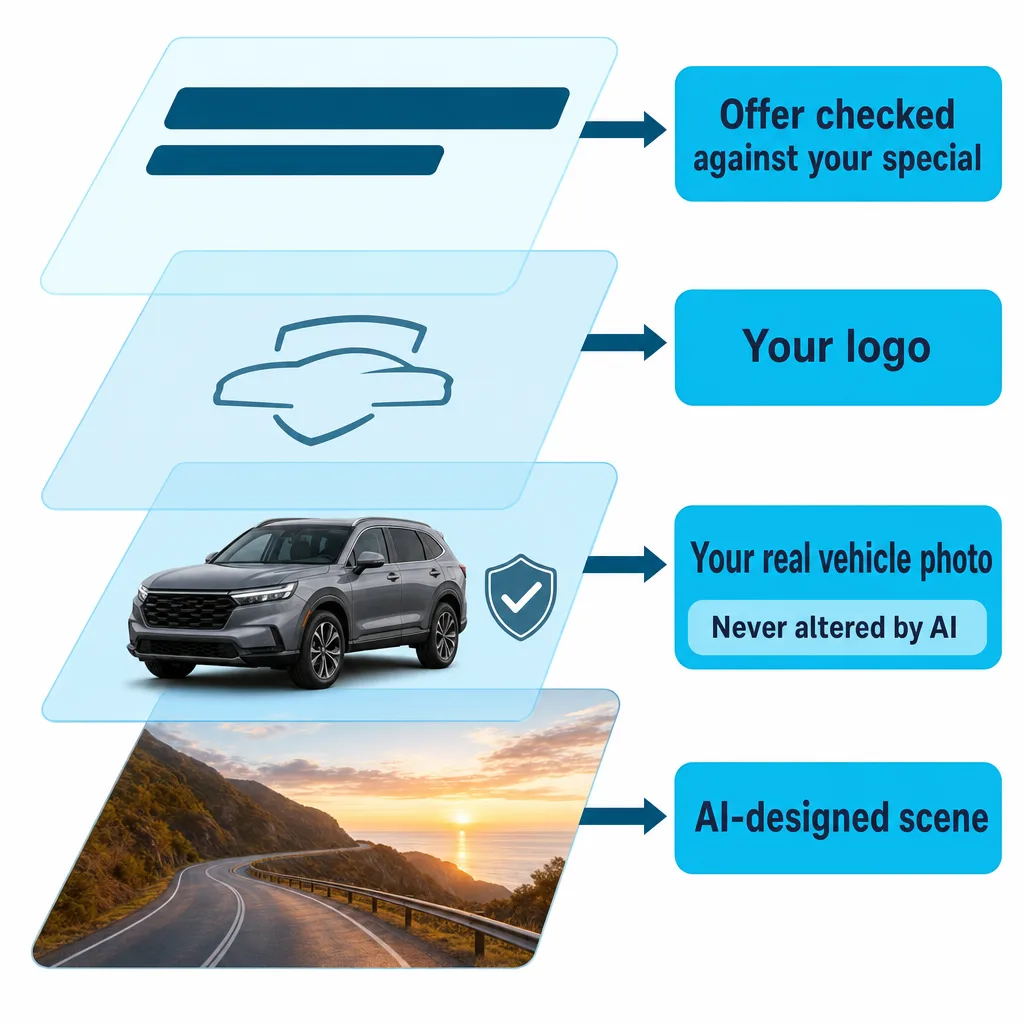
The vehicle on the graphic is your vehicle, and the offer is checked against the one you approved.
- AI never generates the vehicle.
- Graphics use your real vehicle photos, so the vehicle shown is always the correct one, with no AI alteration that could make it look physically wrong.
- A check compares every price, rate and term on the graphic with the offer and flags mismatches.
Built from your specials
Graphics stay tied to the offers they advertise.
- Offers and up to three featured vehicles come straight from Specials.
- Automatic checks flag a graphic when its offer no longer matches.
- Revise once and every variant re-renders with the same look, or start a new campaign with that look.
For one store or a whole group
Scale a campaign across rooftops and the calendar.
- One brief creates a campaign for every dealership in a group, each with its own OEM palette and logo.
- Scheduled campaigns start from a template when a sales event opens or on a set day each month, with optional auto-publish.
Review, then publish
Route graphics through review and approval before they go out, and keep costs in check.
- Review and approval before publishing.
- A monthly spend cap with cost tracking.
- Publish to Facebook posts and covers, Google Performance Max image assets, the email asset library and the creative library.
Library and calendar
Keep every asset and campaign in one place.
- A cloud creative library with folders per dealership for video, audio and graphics.
- A logo library with versions, which feeds the email builder and the Performance Max picker.
- A marketing calendar by month, week or list, filtered by tactic, with events, monthly themes and previews of live ads.
Frequently asked questions
How can I make dealership ad graphics in every size?
Axion Creative Studio turns one brief, with headline, call to action, sales event, logo and visual style, into finished graphics for each placement. Output sizes run from web billboards and content tiles to stories, social squares, Facebook covers and email signatures.
Can AI-generated ad graphics show the wrong price?
Axion Creative Studio checks every price, rate and term on a graphic against the offer and flags mismatches, and automatic checks flag graphics whose offer no longer matches. AI never generates the vehicle either: graphics use your real vehicle photos, so the vehicle shown is always the correct one, with no AI alteration that could make it look physically wrong.
Can one creative campaign be produced for every store in a dealer group?
Yes. In Axion Creative Studio, one brief creates a campaign for every dealership in a group, each with its own OEM palette and logo. Scheduled campaigns can also start from a template when a sales event opens or on a set day each month.
Where can Creative Studio graphics be published?
Axion Creative Studio publishes to Facebook posts and covers, Google Performance Max image assets, the email asset library and the creative library. Graphics can be routed through review and approval before publishing, and a monthly spend cap keeps costs in check.
See Creative Studio make your next campaign
We’ll turn one of your current specials into graphics for each channel you advertise on.